
Connecting CKAN and Galaxy: from data repositories to analysis and back
Browse CKAN datasets in Galaxy, analyse using tools and workflows, and export results to CKAN.
On this page
Research data are often stored and managed separately from the environments used to analyse them. A dataset may be published or maintained in CKAN, they need to be downloaded, analysed in Galaxy, and uploaded again afterwards. CKAN is an open-source platform for managing and sharing datasets through data portals and research data repositories. A new CKAN repository integration in Galaxy connects a CKAN instance to Galaxy. It lets users browse CKAN datasets from Galaxy, and import datasets into a history. The imported datasets can be analysed with Galaxy tools and workflows, and export results back to CKAN.
In CKAN terminology, a dataset is a collection of metadata and resources. Resources are the actual files or links associated with that dataset. In Galaxy, CKAN datasets therefore appear as folders and their resources appear as files.
Public CKAN datasets can be browsed without authentication. Connecting with a CKAN API token additionally makes private datasets available according to user’s CKAN permissions and allows results to be exported when a user has write access.
Connect your CKAN account
To access private datasets or export results, you need a CKAN account and an API token.
CKAN API tokens can usually be created from User Profile > API tokens. See the CKAN API documentation for more information.
In Galaxy, open your user preferences and select Manage Your Repositories, then click on Create and choose CKAN.
Give the connection a descriptive name and provide:
- Your CKAN instance endpoint, for example
https://ckan.example.org. - Your CKAN Access Token if you want to access private datasets.
- Allow Galaxy to export data to CKAN enabled if you want to send Galaxy results back to CKAN.
The token is optional if you only need to browse and import publicly available CKAN datasets.
Access follows the permissions of your CKAN account. Galaxy does not give the connected account additional access to datasets or organizations.
Bring CKAN resources into a Galaxy history
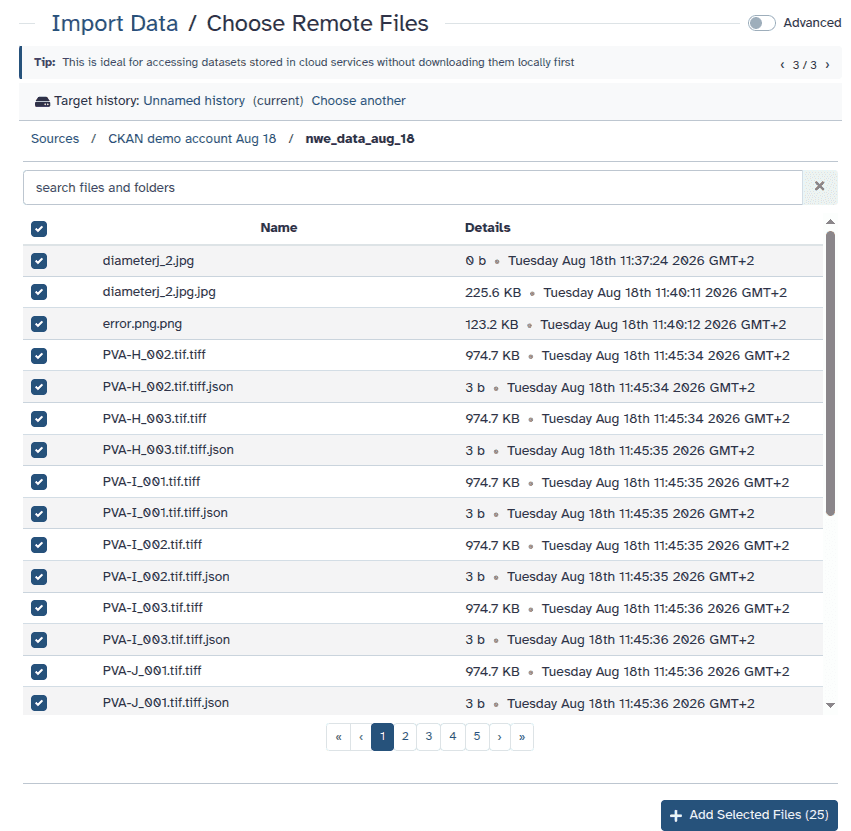
Open Upload, choose Choose remote files, and select your CKAN connection.
Galaxy shows the CKAN datasets that are available to you. With an API token, this includes private datasets that your CKAN account can access.
Without a token, only public datasets are available. You can use the search field to find datasets on larger CKAN instances.
Open a dataset to see its resources. Each CKAN resource is shown as a file that can be selected and imported into a Galaxy history.
Once the resource appears in your history, you can process it using Galaxy tools and workflows as usual.
Send analysis results back to CKAN
Galaxy can export datasets as new resources inside an existing CKAN dataset.
-
Open Galaxy’s Export datasets to repositories tool (
export_remote) and select the Galaxy dataset you want to export. -
Choose your CKAN repository and select the destination CKAN dataset.
-
The export browser only offers datasets that your CKAN account is allowed to modify. CKAN distinguishes between permission to read a dataset and permission to update it.
-
Run the export and return to CKAN. The Galaxy output will appear as a new resource in the selected CKAN dataset.
Public, private, and writable datasets
The datasets visible while importing and exporting can be different.
When importing, Galaxy shows datasets that CKAN allows your account to read:
- Public datasets are available to everyone.
- Private datasets are available when your API token has the required access.
When exporting, Galaxy further restricts the list to datasets that your account can modify.
This means that a public dataset can still be a valid export destination when you have write permission in its organization, while a private dataset may be read-only when your account does not have permission to update it.
Export Galaxy histories
The CKAN integration can also be used with Galaxy’s repository-based history export functionality.
When asynchronous Galaxy tasks are enabled by the server administrator, a Galaxy history can be exported as an archive into an existing CKAN dataset.
The archive becomes another CKAN resource and can later be imported back into Galaxy through Import History.
This can be useful when the analysis itself needs to be preserved alongside other project data stored in CKAN.
A few things to know
-
A CKAN dataset is not the same concept as an individual dataset in a Galaxy history. A CKAN dataset acts as a container that can hold multiple resources.
-
Galaxy imports resources from CKAN datasets. The resource itself may be stored directly by CKAN or may refer to data hosted elsewhere.
-
Export currently adds a new resource to an existing CKAN dataset. Creating a new CKAN dataset directly from Galaxy is not supported.
-
Create datasets, organizations, and their metadata in CKAN before exporting files from Galaxy.
-
The datasets shown during export depend on your CKAN write permissions, not simply on whether a dataset is public or private.
-
CKAN resources can point to files hosted outside the CKAN server itself. Galaxy validates these resource URLs before downloading them and only sends the CKAN API token to resources hosted by the CKAN instance.
By connecting CKAN directly to Galaxy, data can remain organized in the repository used by a project while computational analysis takes place in Galaxy. Input data can move from CKAN into reproducible Galaxy workflows and resulting files can be returned to the same repository without the repeated manual download-and-upload cycle.
Acknowledgements
We thank Adrian Jäger for his work on the CKAN integration into Galaxy.